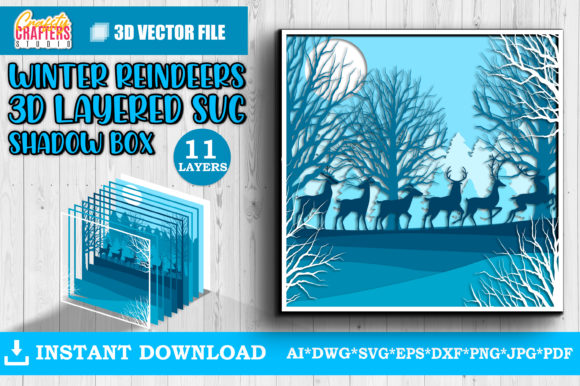
Winter Deer Layered 3D Shadow Box
Creating depth and dimension in paper crafts or laser-cut projects often requires precision that standard flat designs simply cannot provide. The Winter Deer Layered 3D Shadow Box addresses this need by offering a sophisticated, multi-layered design that transforms simple materials into stunning visual displays. Whether you are looking to add a touch of rustic elegance to your home decor or seeking a unique gift for the holidays, this design provides a professional finish with minimal effort. By utilizing an 11-layer structure, the project creates a realistic sense of perspective, making the deer appear as though it is stepping out of a snowy forest.
Understanding the Design and Compatibility
At its core, the Winter Deer Layered 3D Shadow Box is a digital asset designed for precision cutting and engraving. It consists of 11 distinct layers, each contributing to the overall depth and detail of the final piece. This complexity allows for intricate details such as antler textures, facial features, and background elements like trees or snowflakes to be separated and stacked, creating a true three-dimensional effect.
The versatility of this file lies in its broad compatibility with modern crafting technology. The cut files are optimized for a wide range of machines, ensuring that both hobbyists and professionals can utilize the design regardless of their specific equipment. It is fully compatible with popular electronic cutting machines including the Silhouette Cameo 3, Silhouette Cameo 4, Cricut Explore Air 2, and Cricut Maker. Furthermore, for those who prefer laser engraving, the design works seamlessly with Glowforge, K40, Beamo Flux, Epilog, and Atomstack CO2 laser machines.
When selecting your file format, the SVG (Scalable Vector Graphics) file is generally the best choice. SVGs are vector-based, meaning they retain their quality at any size. This format is supported by most cutting machines and industry-standard vector software like Adobe Illustrator and Inkscape. However, if you are using Basic Silhouette Studio, which has limited support for certain vector formats, the DXF file serves as an excellent alternative. Both formats ensure that your machine receives clear, precise instructions for cutting or engraving.
Material Selection and Machine Considerations
One of the greatest strengths of the Winter Deer Layered 3D Shadow Box is its adaptability to various materials. While cardstock is the traditional medium for shadow boxes, this design encourages experimentation. You can decrease or increase the size of the design significantly, but it is crucial to consider the physical limitations of your chosen material when scaling down. Reducing the design too much may result in thin, small elements becoming fragile or difficult to cut cleanly.
- Cardstock: Ideal for beginners and colorful displays. Try different colors to match your theme.
- Glitter Sparkle Cardstock: Adding a layer of glitter cardstock can create a magical, eye-catching effect, particularly for the snow or highlights on the deer’s coat.
- Wood and Plywood: For a more durable, rustic look, plywood or MDF works beautifully. Laser engraving on wood brings out natural grain patterns that complement the winter theme.
- Acrylic and Plexiglass: These materials offer a modern, sleek aesthetic. Clear or colored acrylic can mimic ice or snow effectively.
- Plastic: Various plastics can be used, though ventilation and safety precautions are necessary during laser cutting.
Before beginning any project, always consult your machine’s instruction manual. Different machines have varying capabilities regarding material thickness, heat tolerance, and tool requirements. For instance, while a Cricut might handle thick chipboard well, a laser cutter might require specific air assist settings for acrylic to prevent melting. Ensuring your machine supports the material you choose is essential for achieving clean cuts and avoiding damage to your equipment.
Practical Applications Across Industries
The utility of the Winter Deer Layered 3D Shadow Box extends far beyond personal hobbyist projects. Its professional-grade design makes it suitable for a variety of commercial and educational applications.
Crafting and Small Business Ventures
For entrepreneurs and makers, this design offers a high-value product opportunity. Because the layers are pre-defined, production time is reduced compared to designing from scratch. Sellers can offer these shadow boxes as finished products on platforms like Etsy or at local craft fairs. The ability to use different materials allows for tiered pricing; basic cardstock versions can be affordable gifts, while engraved wooden or acrylic versions can be sold as premium home decor items.
Home Decor and Interior Design
In residential settings, the Winter Deer Layered 3D Shadow Box serves as a striking focal point. It fits perfectly in entryways, living rooms, or bedrooms, adding a seasonal touch without being overly cluttered. The layered nature of the design draws the eye inward, creating a calming, immersive experience. Homeowners can customize the color palette to match existing decor, using neutral tones for a minimalist look or vibrant colors for a playful atmosphere.
Educational and Creative Workshops
Educators and workshop leaders can use this design to teach principles of spatial awareness, layering, and material science. Students can experiment with how different materials interact with light and shadow. For example, comparing how light passes through translucent acrylic versus opaque cardstock helps learners understand material properties. Additionally, the step-by-step assembly process teaches patience and attention to detail, valuable skills for students of all ages.
Corporate Gifting and Branding
Businesses looking for unique holiday gifts can incorporate this design into their branding efforts. By engraving company logos or custom messages onto the wooden or acrylic layers, companies can create memorable, personalized gifts for clients and employees. The professional appearance of a laser-cut shadow box conveys thoughtfulness and sophistication, enhancing brand perception.
Maximizing Creativity and Results
To get the most out of the Winter Deer Layered 3D Shadow Box, creativity is key. Do not limit yourself to standard white cardstock. Experimenting with textured papers, metallic foils, or even fabric can yield unexpected and beautiful results. If you are working with wood, painting individual layers before assembly can add depth and contrast. For instance, painting the background layers in deep blues or greens can simulate a twilight forest scene, while leaving the deer in natural wood tones keeps the focus on the subject.
Lighting also plays a crucial role in showcasing the 3D effect. Placing LED lights behind or within the shadow box can enhance the layers, casting dramatic shadows and highlighting the intricacies of the design. This is particularly effective with darker materials or when using translucent layers.
Finally, remember that the success of your project depends on preparation. Always run a test cut or engrave a small section of your material to check for alignment and power settings. This simple step can save time and materials, ensuring that your final Winter Deer Layered 3D Shadow Box is a masterpiece worthy of display. By combining the right tools, materials, and creative vision, you can produce stunning works of art that resonate with viewers and stand the test of time.