Creating Depth and Dimension: A Comprehensive Guide to the 3D Trick or Treat SVG Design
Halloween is a holiday that thrives on atmosphere, creativity, and personal expression. While store-bought decorations offer convenience, there is an undeniable charm in crafting items by hand that reflect your unique style. Among the most popular trends in recent years has been the rise of layered paper art, specifically using SVG (Scalable Vector Graphics) files for cutting machines like Cricut and Silhouette. One standout design in this category is the 3D Trick or Treat SVG. This intricate project transforms simple sheets of cardstock into a stunning three-dimensional display that captures the whimsical spirit of the season.
If you are looking to elevate your Halloween decor from flat cutouts to immersive installations, understanding how to work with multi-layered designs is essential. This guide will walk you through the process, significance, and creative possibilities of creating this specific six-layer masterpiece, ensuring you get the most out of your digital files and physical materials.
Understanding the Technology: What is an SVG?
To fully appreciate the potential of the 3D Trick or Treat design, it is helpful to understand the medium through which it is delivered. An SVG file is a vector-based image format, meaning it uses mathematical equations to define shapes rather than pixels. This allows the design to be scaled up or down without losing quality—a critical feature for crafting projects where you might want to create small gift tags or large wall hangings from the same source file.
Unlike raster images (like JPEGs or PNGs), which can become blurry when enlarged, SVGs remain crisp at any size. When paired with electronic cutting machines, these files allow for precision cuts that would be nearly impossible to achieve with scissors or standard craft knives. The result is clean edges and perfect alignment, which is vital when assembling complex, multi-layered structures.
The Art of Layering: Why Six Layers Matter
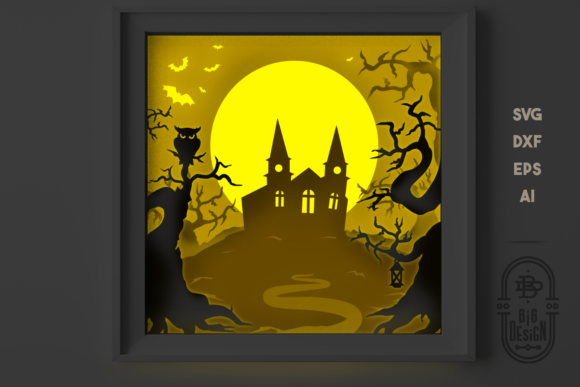
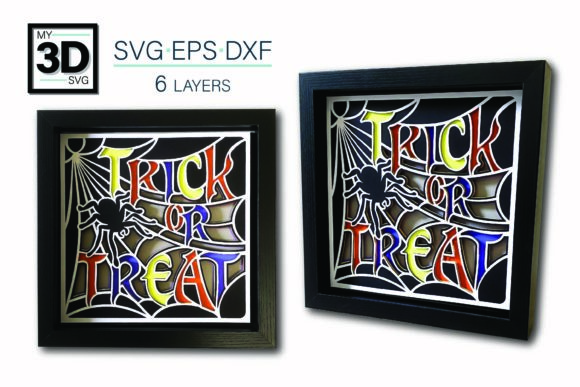
The core appeal of the 3D Trick or Treat SVG lies in its complexity. This particular design features six distinct layers. In paper crafting, "layering" refers to stacking multiple cut pieces of material on top of one another to create depth. Each layer represents a different element of the scene—perhaps the background sky, the middle-ground trees, and the foreground characters holding their trick-or-treat bags.
Building Dimension Through Color and Contrast
The magic of this design is not just in the number of layers, but in how they interact. By changing the colors of the cardstock for each layer, you can dramatically alter the mood and visual impact of the final piece. For instance:
- Mono-chromatic Schemes: Using varying shades of orange and black can create a sophisticated, modern look.
- High Contrast: Pairing bright white layers with deep purple backgrounds makes the silhouette pop, ideal for nighttime visibility.
- Pastel Palettes: Soft pinks, mint greens, and lavenders can give the traditional spooky theme a cute, kid-friendly twist.
This flexibility means that the 3D Trick or Treat SVG is not a static product; it is a template for your own artistic expression. You are encouraged to experiment with color combinations to see how the design changes, allowing you to match your existing home decor or party theme perfectly.
Material Matters: Choosing the Right Cardstock
While the digital file provides the blueprint, the physical materials determine the durability and finish of your project. The instructions provided with the 3D Trick or Treat SVG recommend using standard 8.5x11 inch cardstock. This size is convenient because it fits directly into most home printers and cutting machine trays without needing to be resized or taped together.
However, not all cardstock is created equal. Here are some tips for selecting the best material:
- Weight and Thickness: Standard cardstock usually ranges from 65lb to 80lb cover weight. This thickness is sturdy enough to hold its shape when layered but flexible enough to fold if necessary. Avoid heavy-duty construction paper, as it may clog your cutting blades or fail to feed smoothly through the machine.
- Color Consistency: If you plan to use multiple sheets of the same color, buy them from the same brand and batch. Lighting conditions can make slight variations in hue very apparent in layered designs.
- Texture: Smooth matte cardstock generally yields the cleanest look for detailed vector cuts. Textured papers (like linen or watercolor paper) can obscure fine details and make cutting more difficult.
File Compatibility and Software Support
One of the significant advantages of purchasing high-quality SVG bundles is their versatility across different software platforms. The 3D Trick or Treat SVG comes packaged in multiple formats to ensure compatibility regardless of your preferred cutting software.
Supported Formats Explained
When you receive your download, you will find the following file types included:
- SVG: The universal standard for cutting machines. This file opens natively in Cricut Design Space, making it easy for Cricut users to import, arrange, and send to their machines immediately.
- DXF: Designed specifically for Silhouette Studio. Silhouette users will appreciate having a dedicated DXF file, as it ensures optimal performance within that specific ecosystem.
- EPS: An Encapsulated PostScript file compatible with professional graphic design software such as Adobe Illustrator, Make the Cut, CorelDRAW, and Inkscape. This is particularly useful for designers who wish to edit the paths, add custom text, or combine the trick-or-treat elements with other graphics before cutting.
This multi-format approach ensures that whether you are a casual crafter with a Cricut Maker or a professional designer using Adobe Creative Cloud, you have the tools necessary to bring the design to life.
Assembly and Instructions
A common concern among beginners is the complexity of assembling a six-layer design. Will it fall apart? Is the assembly confusing? To address this, the seller includes a comprehensive PDF instruction manual with every purchase. These instructions are designed to guide you step-by-step through the assembly process.
The PDF typically includes:
- Layer Identification: Clear numbering or labeling of each sheet to ensure you place them in the correct order.
- Adhesive Recommendations: Tips on whether to use double-sided tape, foam pads for extra depth, or glue dots for a secure bond.
- Alignment Guides: Visual cues to help you center each layer perfectly, preventing misalignment that could ruin the 3D effect.
Having these instructions removes the guesswork, allowing you to focus on the enjoyment of the crafting process rather than worrying about technical errors.
Practical Applications and Modern Relevance
Why choose a 3D Trick or Treat SVG over a traditional decoration? In today’s social media-driven world, decorations serve a dual purpose: they enhance our living spaces and provide content for sharing. A layered 3D design offers a level of detail and texture that photographs beautifully, making it perfect for Instagram, Pinterest, or TikTok tutorials.
Beyond aesthetics, these projects promote mindfulness and creativity. The act of cutting, sorting, and assembling layers requires focus and patience, offering a therapeutic break from digital screens. Furthermore, these designs are highly reusable. Once assembled, the 3D Trick or Treat sign can be mounted on a door, hung in a window, or displayed on a mantelpiece year after year.
Customization for Different Audiences
The versatility of this design extends to its audience. It is equally suitable for:
- Home Decorators: Adding a festive touch to entryways and living rooms.
- Teachers: Creating classroom displays that celebrate the season while teaching students about vector art and paper engineering.
- Small Business Owners: Using the design for storefront windows to attract customers during the Halloween shopping season.
Do I need expensive equipment?
No. As long as you have a basic electronic cutting machine (like a Cricut Explore or Silhouette Cameo) and a computer or tablet to run the design software, you have everything you need. The files are optimized for standard home-use machines.
Can I sell items made from this SVG?
This depends on the license agreement provided by the creator. Typically, personal use licenses allow you to sell physical items you create, but you cannot resell the digital file itself. Always check the specific terms included with your download.
What if I have questions during the process?
Support is a key part of the crafting community experience. Creators of these designs often provide direct lines of communication for troubleshooting. If you encounter issues with file opening, cutting settings, or assembly, reaching out to the designer is encouraged. They are usually happy to answer questions and help you achieve the best results.
Conclusion
The 3D Trick or Treat SVG represents the intersection of technology and traditional craft. By leveraging the precision of vector graphics and the tactile joy of paper crafting, you can create decorations that are both visually striking and deeply personal. With support for major software platforms, clear instructions, and endless customization options through color variation, this six-layer design is an excellent choice for anyone looking to add a touch of dimensional magic to their Halloween celebrations. Whether you are a seasoned pro or a first-time cutter, this project offers a rewarding challenge and a beautiful finished product.