Unlocking Depth: How the Butterfly 3D Laser Cut Template Transforms Simple Cuts into Dimensional Art
There is a distinct magic in taking a flat, two-dimensional design and watching it transform into something with depth, shadow, and presence. For crafters who rely on laser cutters, CNC machines, or electronic cutting tools like Cricut and Silhouette, this transformation is not just an aesthetic choice—it is a technique that elevates ordinary projects into gallery-worthy pieces. The Butterfly 3D Laser Cut Template is designed specifically to facilitate this leap from flat to form, offering a sophisticated solution for anyone looking to add a layer of complexity and visual interest to their crafting workflow.
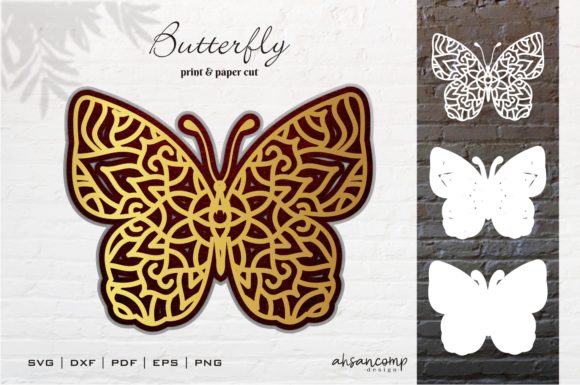
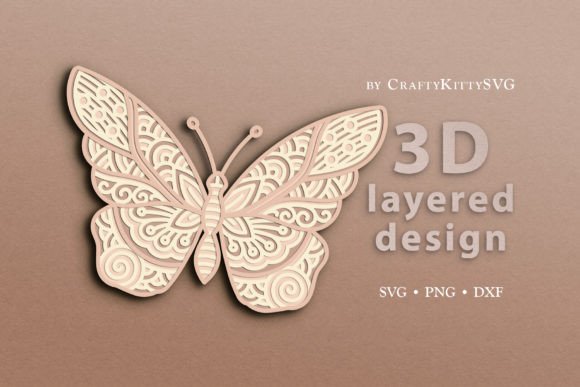
Unlike standard single-layer designs that sit flush against the material, a 3D layered template utilizes multiple strata to create perspective. Think of it as digital origami meets industrial precision. When you look at a butterfly, you don’t just see wings; you see the curve of the body, the subtle gradient of the wing edges, and the delicate veins that give the insect its structure. This template captures those nuances by breaking the image down into four distinct layers. Each layer acts as a building block, allowing light to pass through gaps and cast shadows that simulate volume without the need for complex assembly techniques or expensive molding processes.
The Power of Vector Precision in Layered Design
At the heart of any successful laser cut project lies the quality of the source file. Raster images, like JPEGs or PNGs, are made of pixels and often struggle with the fine tolerances required by laser engravers and cutters. That is why the inclusion of vector-based files in this package is critical. Vectors use mathematical equations to define lines and curves, ensuring that every edge remains crisp and accurate regardless of how much you scale the design up or down.
The Butterfly 3D Laser Cut Template comes complete with a comprehensive suite of formats, ensuring compatibility across the vast ecosystem of modern crafting software. Whether you are working in the cloud or on a local desktop, you will find the right tool for the job:
- SVG Files: These are the gold standard for users of Cricut Design Space and Glowforge. SVGs allow for easy manipulation within these platforms, enabling you to arrange your layers, assign colors for different materials, and prepare the design for both cutting and engraving seamlessly.
- DXF Files: If your workflow leans towards professional-grade hardware, the DXF format is essential. It is fully compatible with Silhouette Studio and various CNC laser machines. This ensures that whether you are running a small home business or operating in a larger workshop, the geometry of the butterfly remains intact and precise.
- PNG Files: For those who prefer a more traditional approach or need to print physical guides before cutting, high-resolution PNG files are included. These are ready-to-print and can also be used for direct engraving in certain software environments, providing flexibility for artists who like to visualize their work on paper first.
It is important to note that while the preview images may showcase specific color palettes, these are merely illustrative examples. One of the greatest advantages of digital vector templates is the ability to customize. You can change the size, adjust the proportions, and most importantly, select the colors of your materials to match your decor or brand identity perfectly.
Material Versatility: From Cardstock to Metal
One of the common misconceptions about laser cutting is that it is limited to thin papers or woods. However, the technology is incredibly versatile, and the Butterfly 3D Laser Cut Template is designed to perform beautifully across a wide spectrum of substrates. The choice of material dictates not only the durability of the final piece but also its texture and how it interacts with light.
For beginners or those creating party decorations, cardstock and colored paper are excellent choices. They are affordable, easy to work with, and allow for vibrant color contrasts between the four layers. A white background layer with a dark blue butterfly silhouette creates a striking moonlight effect, while warm tones can evoke a sunset scene.
When moving up to more durable materials, wood, plywood, and MDF (Medium-Density Fiberboard) offer a natural, rustic aesthetic. The grain of the wood adds organic texture that complements the intricate details of the butterfly’s wings. Plywood, in particular, holds up well to the heat of laser cutters and provides a sturdy base for wall hangings or furniture accents.
For a modern, sleek look, consider using acrylic or plexiglass. Acrylic allows light to pass through, making it ideal for lamp shades or backlit displays where the 3D layers will glow from behind. The smooth surface of acrylic also highlights the precision of the cut edges, giving the piece a polished, commercial-grade finish.
Even advanced materials like metal sheets can be used, provided your machine has the appropriate power settings. A metallic butterfly cut from brass or aluminum sheeting can serve as a stunning, minimalist art piece that reflects ambient light in dynamic ways. The key is adjusting your machine’s speed and power settings for each material to ensure clean cuts without burning or charring the edges.
Workflow Integration and Practical Applications
Incorporating the Butterfly 3D Laser Cut Template into your projects requires a bit of planning, particularly regarding the assembly process. Because the design consists of four separate layers, you will need to cut each layer individually. This might seem time-consuming, but it offers significant creative control. You can experiment with different materials for each layer—for example, using black acrylic for the deepest layer to create shadow, and translucent pink for the top layer to mimic the translucency of real wings.
Assembly typically involves spacers or adhesive dots placed between the layers to maintain consistent depth. This technique, often called "relief carving" in digital fabrication, prevents the layers from touching and blending together, preserving the illusion of three-dimensionality. Once assembled, the result is a lightweight yet structurally sound object that appears to float.
The applications for such a design are nearly limitless. In interior design, these butterflies make exquisite wall art, adding a touch of nature-inspired elegance to living rooms, nurseries, or offices. In the realm of events, they can be used as custom backdrop elements for weddings, baby showers, or corporate branding events. Imagine a wedding reception where the table numbers are mounted on miniature versions of this 3D butterfly, crafted from ivory cardstock and gold foil-accented paper.
Furthermore, educators and hobbyists can use this template to teach principles of geometry, symmetry, and material science. By analyzing how the layers interact, students can learn about negative space, structural integrity, and the properties of different materials. It turns a simple craft project into an educational experience.
Considerations for Optimal Results
While the Butterfly 3D Laser Cut Template simplifies the creation of complex designs, success still depends on proper machine calibration and material preparation. Always run test cuts on scrap pieces of your chosen material to determine the correct focus height, speed, and power. Different brands of wood or acrylic may have varying densities and resins that affect how they burn or melt.
Additionally, consider the orientation of your design on the bed of your cutter. Since there are four layers, you will need to reposition the material or use registration marks if your machine supports them, to ensure perfect alignment between cuts. Misalignment can ruin the 3D effect, causing the wings to appear jagged or uneven.
Finally, think about the display environment. Light plays a crucial role in appreciating 3D laser cuts. Placing your butterfly near a window or under a directed spotlight will enhance the shadows and depth, making the piece come alive. Conversely, placing it in a dark corner may obscure the intricate details that took so much care to create.
Ultimately, the value of this template lies in its ability to bridge the gap between technical precision and artistic expression. It provides the framework, but your creativity fills in the details. By leveraging the compatibility of SVG, DXF, and PNG formats, and experimenting with diverse materials, you can produce unique, high-quality pieces that stand out in any setting. Whether you are a seasoned pro or just starting your journey with laser cutting, the Butterfly 3D Laser Cut Template offers a reliable and inspiring foundation for your next creative endeavor.