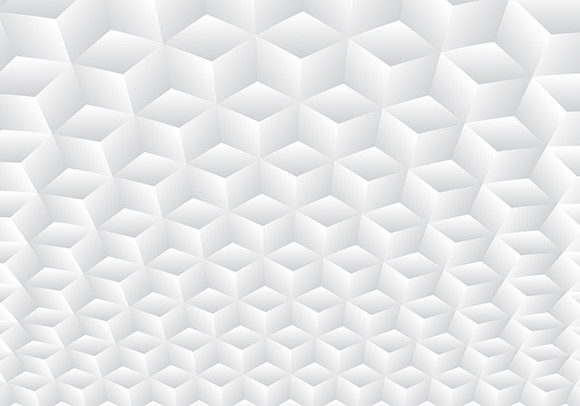
3D White Geometric Cubes Pattern Texture
When you are staring at a blank canvas in Adobe Illustrator or trying to find the perfect backdrop for a high-stakes pitch deck, the right texture can make all the difference. It is not just about filling space; it is about setting a tone. The 3D White Geometric Cubes Pattern Texture offers a sophisticated blend of modern minimalism and structural depth. By combining realistic geometric symmetry with a crisp white and gray gradient palette, this design creates an illusion of volume without overwhelming the viewer. It is a versatile asset that bridges the gap between abstract art and functional design, making it a staple for professionals who need clean, impactful visuals.
The Power of Minimalist Depth
Why do so many designers gravitate toward simple cubes? The answer lies in their psychological impact. A cube is a fundamental shape, representing stability, order, and logic. When rendered in 3D with subtle gradients, it adds a layer of realism that flat colors cannot achieve. The interplay of light and shadow on these geometric forms guides the eye naturally across the composition. This makes the 3D White Geometric Cubes Pattern Texture particularly effective for backgrounds where text needs to remain readable. The gray gradients provide enough contrast to support typography without creating visual noise.
This texture works beautifully in corporate environments where clarity is paramount. Imagine a landing page for a fintech startup. You want to convey trust and precision. A background of floating, softly lit cubes suggests structure and reliability. It tells the user that your platform is built on solid foundations. Similarly, in the medical or pharmaceutical sectors, the sterile white tones evoke cleanliness and innovation, while the geometric arrangement hints at scientific rigor.
Real-World Applications Across Industries
While the aesthetic appeal is undeniable, the practical utility of this vector pattern extends far beyond decorative purposes. Because the file is fully editable and available in high-resolution formats like EPS Version 10 and JPG, it adapts seamlessly to various media types. Here is how different professionals are leveraging this specific texture:
- Tech Startups and SaaS Platforms: For software companies, the "cube" often symbolizes modular building blocks or data structures. Using this pattern in hero sections or feature highlights reinforces the idea of customizable, scalable solutions. The 300dpi resolution ensures that whether viewed on a mobile screen or a large conference monitor, the edges remain sharp and professional.
- Architectural and Interior Design Portfolios: Architects love geometry. This pattern mirrors the structural elements of modern buildings—facades, windows, and spatial arrangements. Designers use it as a subtle watermark or background element in presentation slides to tie their brand identity to the physical spaces they create. The vector nature allows them to scale the cubes to match the perspective of a rendered image perfectly.
- E-commerce and Product Packaging: In retail, unboxing experiences matter. A box featuring a faint, embossed-style geometric cube pattern feels premium and tactile. Even if printed digitally, the grayscale gradients mimic the look of foil stamping or debossing, adding perceived value to the product inside. It is a cost-effective way to elevate packaging design without complex printing processes.
- Event Branding and Conference Materials: Trade shows are visually chaotic. To stand out, booths and digital signage need clean lines. This pattern provides a structured grid that organizes information hierarchically. Event organizers use it for backdrops, brochures, and app interfaces to create a cohesive look that feels organized and easy to navigate.
Why Vector Quality Matters for Your Workflow
You might be wondering why the format specifics—like being 100% vector and compatible with Corel Draw and Adobe Illustrator—are worth highlighting. The short answer is flexibility. Raster images (like standard JPEGs) lose quality when scaled up, leading to pixelation. With a fully editable vector file, you have complete control over every aspect of the design. Need to change the shade of gray to match your brand’s exact hex code? Done. Want to adjust the size of the cubes or remove one entirely to place a logo? That is possible too.
This level of editability is crucial for agencies working under tight deadlines. Instead of hiring a designer to recreate a pattern from scratch, you can import the EPS Version 10 file and tweak it to fit your specific layout. The fact that it is readable by major graphic programs means there is no learning curve or compatibility headaches. You open the file, and it behaves exactly as you expect. This saves time and reduces frustration, allowing you to focus on the creative strategy rather than technical troubleshooting.
Considerations for Implementation
While the 3D White Geometric Cubes Pattern Texture is incredibly versatile, there are a few things to keep in mind to ensure it enhances rather than detracts from your project. First, consider the density of the pattern. If used as a full-page background, a dense arrangement of cubes might compete with foreground content. In such cases, reducing the opacity or scaling up the individual cubes can create a more airy, breathable feel. Conversely, for accent areas like sidebars or footer graphics, a tighter packing can add visual weight and interest.
Another consideration is color harmony. Although the pattern is primarily white and gray, it interacts heavily with whatever color you place on top of it. Test your primary brand colors against the texture to ensure sufficient contrast. Light pastels might get lost against the white highlights, while dark, saturated colors will pop dramatically. Experimenting with these combinations can yield unexpected and striking results.
It is also important to remember that while the visual effect is 3D, it is technically a 2D vector illustration. This means it lacks true volumetric lighting changes based on viewer interaction. However, for print materials, static web backgrounds, and social media graphics, this limitation is irrelevant. The simulated depth provided by the gradients is more than enough to create a convincing sense of space.
Maximizing Creative Potential
To get the most out of this asset, think outside the box—or rather, inside the cube. Try using negative space within the pattern to reveal underlying textures or photographs. For instance, placing a high-quality image behind the geometric layer and adjusting the blend modes can create a layered, sophisticated look. This technique is popular in modern web design for creating immersive scrolling experiences.
Additionally, don’t limit yourself to static applications. Since the file is editable, you can animate the cubes in tools like After Effects. Having a slight rotation or floating motion applied to the geometric shapes can bring a static website to life, increasing engagement and dwell time. The smooth gradients hold up well during animation, maintaining their realistic appearance even when moving.
In summary, the 3D White Geometric Cubes Pattern Texture is more than just a pretty picture. It is a functional design tool that supports clarity, professionalism, and modern aesthetics. Whether you are designing a brochure, a website, or a product package, its adaptability and high-quality vector construction make it a reliable choice. By understanding how to apply it strategically across different industries and contexts, you can elevate your projects with minimal effort and maximum impact.